It looks like you're using an Ad Blocker.
Please white-list or disable AboveTopSecret.com in your ad-blocking tool.
Thank you.
Some features of ATS will be disabled while you continue to use an ad-blocker.

Weird Moon Anomaly! A Big UFO Or Artificial Structure?
page: 9share:
I can not know for sure how things happened, but this is what I think.
Originally posted by mikesingh
So the question is, was the anomaly removed from ver. 2.0 of the CB? If not, then what or why did that anomaly show up in the first place? What exactly was it? Tape, paper clip, spilled coffee or just a glitch? Now that is the proof I require!
Those images on the browser, regardless of version, do not exist. When we choose any resolution, only when we choose the resolution that corresponds to that of the photos available for that area can we see the real photos. If we choose a different resolution then the software must look for the photos available for that area, join them, and send them as one image for our web browsers.
And is in this step that I think that the problem is. The first version of the image browser did not worked as it should when joining the images, especially when it was for an area for which on or more images are missing, that is why it created those strange grey areas.
The images used on both versions, as I said before, are the same and available on that site to which I pointed more than once and from which I get the images when I need.
So, in my opinion, and in this case I can say in my professional opinion as a programmer, the strange images from the previous version of the image browser are the result of bad programming.
reply to post by internos
Agreed upto a point!
BUT the fact remains that there IS something out there with a clear triangular shape! Unfortunately there seems to be a dearth of images of the far side.
Probably! One way to solve the mystery once and for all is to get pics of the same area, but as internos mentioned, not from Clementine. And that's hard to lay your hands on!
That's why I'm awaiting the Chinese and Indian Moon probes. Let's see what they beam back! I think that's our only hope! Or are they all in cahoots with NASA/CIA/Mil Intelligence/NSA and other American and European intell agencies? One never knows what the heck is going on at the highest levels.
Oh, well. Back to the bar!
Cheers!
[edit on 23-9-2007 by mikesingh]
Agreed upto a point!
BUT the fact remains that there IS something out there with a clear triangular shape! Unfortunately there seems to be a dearth of images of the far side.
Originally posted by ArMaP
So, in my opinion, and in this case I can say in my professional opinion as a programmer, the strange images from the previous version of the image browser are the result of bad programming.
Probably! One way to solve the mystery once and for all is to get pics of the same area, but as internos mentioned, not from Clementine. And that's hard to lay your hands on!
That's why I'm awaiting the Chinese and Indian Moon probes. Let's see what they beam back! I think that's our only hope! Or are they all in cahoots with NASA/CIA/Mil Intelligence/NSA and other American and European intell agencies? One never knows what the heck is going on at the highest levels.
Oh, well. Back to the bar!
Cheers!
[edit on 23-9-2007 by mikesingh]
Originally posted by Chorlton
Have you considered the idea that it might have been someone with a sense of humour that put it there? 'lets put something on one of the pics and see what the conspiracy people come up with'
I'd have done it, given my sense of humour.
Heck man! Don't those guys at Military Int have anything better to do? You think they would be screwing your tax dollars on whimsical pranks? Naaah! Though that's fine with me as I'm not concerned with paying American taxes!! I'm on Moon Base Delta!!
Cheers!
[edit on 23-9-2007 by mikesingh]
its also possible that whatever is being 'airbrushed' is of a concern for national security...could be something man-made that wound up there
(satelitte, nasa craft of some kind) and not alien in nature.
[edit on 23-9-2007 by blueyedevil666]
[edit on 23-9-2007 by blueyedevil666]
Originally posted by ArMaP
This photo is available on the site that I have posted before, but that apparently nobody wants to see.
LOL now you see what I am up against "nobody WANTS to see"
Thanks for that link ArMaP I did not have that database
Originally posted by Chorlton
Have you considered the idea that it might have been someone with a sense of humour that put it there?
'lets put something on one of the pics and see what the conspiracy people come up with'
I'd have done it, given my sense of humour
Wow A useful contribution
There may be hope for you yet
Yes not only considered it but have proof...
Nasa thinks nothing of the public... what the heck lets just pull a prank and see what they do... never mind we pay their salary... but since people are SHEEP who carez? They won't do anything about it... so NASA gets to rule space
My proof?
Ah well see now to see that you would have to visit my webpage... well at least until I have time to post it
NASA Evidence
Mike and Internos You have just GOT to see this... I found the fossil rock!!! Its called "Humphrey"
Originally posted by ArMaP
So, in my opinion, and in this case I can say in my professional opinion as a programmer, the strange images from the previous version of the image browser are the result of bad programming.
Well that is ONE explanation to be sure.. a little complicated, but it might be...
or it could be that they needed the 10 years before they released the final version to fix any previous mistakes...
So any work on our Japanese Spaceship?
reply to post by zorgon
Ah..the spoilsports they have smudged it out.
Still they can't imake it to obvious can they.
[edit on 23-9-2007 by sherpa]
[edit on 23-9-2007 by sherpa]
Mike and Internos You have just GOT to see this... I found the fossil rock!!! Its called "Humphrey"
Ah..the spoilsports they have smudged it out.
Still they can't imake it to obvious can they.
[edit on 23-9-2007 by sherpa]
[edit on 23-9-2007 by sherpa]
Originally posted by blueyedevil666
its also possible that whatever is being 'airbrushed' is of a concern for national security...could be something man-made that wound up there (satelitte, nasa craft of some kind) and not alien in nature.
I am with you on that 'man made' part and as to the 'National Security' issue, I can tell you first hand how correct you are... That 'knowledge" came as a result of looking into ways to hide spaceships and someone laughed and said 'cloaking devices' ... which leads right up to stealth technology. And questions in that department definitely draw attention
Funny thing that people forget when they scream for 'proof' IF they have something like that, a base, a secret station, whatever... well THEY don't want you to find it If you do get to close... you get visits from those nice gentlemen that talk in a monotone and prefer dark colors in their attire...
And as we were 'reminded' recently...
"Just be careful.. They probably don't consider you guys to be a threat, or they'd have already 'bored you to death with conversation'"...
reply to post by sherpa
Whoops..just looked at the big picture of Humphrey, nothing there.
Teach me to not look at all the images.
Whoops..just looked at the big picture of Humphrey, nothing there.
Teach me to not look at all the images.
Anyone looking at that picture cannot deny the fact of a huge machine structure there. Look at the ridges, spaced apart exactly, look at the left side
as flat and on the right where the airbrushing is, the thing drops off way down far.; imagine a skyscraper made of machione steel rising up from out
of sight on the right and at the top it shows the roof of the thing.
This is no ' digital glitch ', the odds are astronomical that this is a gigantic machine of some type or leading to a part of the moons internal structure where the real mechanics of maintaining a plantoid sized craft are dealt with while we eat our Wheaties. It is unmistakably a huge structure and I cannot fathom how anyone can mistake this for anything else.
This is no ' digital glitch ', the odds are astronomical that this is a gigantic machine of some type or leading to a part of the moons internal structure where the real mechanics of maintaining a plantoid sized craft are dealt with while we eat our Wheaties. It is unmistakably a huge structure and I cannot fathom how anyone can mistake this for anything else.
you will find the mars video on [forlonhope80]there you will see some matian critters that look to me like Groundhogs or goafers
Originally posted by zorgon
Mike and Internos You have just GOT to see this... I found the fossil rock!!! Its called "Humphrey"
Ok, this is kinda off topic, for the Mars Critters thread actually!!
Wow! That sure looks like a four-legged critter, fossilized perhaps! Now why has NASA brushed it out in the enlargement? It's clearly tampered with! And if there was nothing there in the first place, why was it circled/highlighted? You don't go around circling stuff for the heck of it! So there was something there which has been wiped clean.
And why is nobody talking about this impression-in-the-mud pic. I find it equally fascinating if not more than Humphrey!
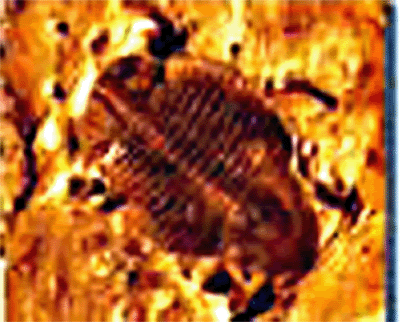
So what made that very geometrically lined impression? A fossil with a backbone??
Cheers!
Keep posting those excellent links and photos zorgon!! I for one love them and invite any and all data on this subject!! Keep up the great work!!
Awsome thread and great photos with some rather interesting theories (on both sides of the fence ) .. Keep up the great work and keep those pictures
comming ..ehh I wish I could find some good pictures to contribute but oh well I'll stick to reading and analyzing for now
It looks like it's in motion. Possible craft, rover or even satellite seem from above.
zorgon:
thank you for the fantastic pics which (as usual) you provided, really amazing.
I'm impressed by the one of the fossil: is there any way to investigate on it?
Ah..
Do you know if there are moon pics from the far side available somewhere (NOT made by Clementine of course.)?
About the Seidel crater, (the one of the triangle)
i've noticed that anyway there's something odd IMHO.
Of course this will be shortly explaned by someone.
I wonder what is that object, which looks to be wrapped by an apparently
semi-transparent substance. I'm just curious, nothing else.

Source:
solarsystem.wipecentral.net...
BTW:
Mike:It seems that you've found a sheep on the Moon (a space sheep?)
Don't worry about it, that's normal: i've found a dog on Mars.

Source:
antwrp.gsfc.nasa.gov...
Found these Orbiter pics:
Chair?

www.lpi.usra.edu...
Something shooting (anti aircraft) ?

www.lpi.usra.edu...
Cigar shaped object ?

www.lpi.usra.edu...
Take a look at this now, cropped from
www.lpi.usra.edu...
www.lpi.usra.edu...
Maybe i'm wrong, but IMHO the shape of the object looks odd? I'll check.

www.lpi.usra.edu...
www.lpi.usra.edu...
Edit:
The last one is the Tsiolkovsky sea, that's its natural shape.

[edit on 25/9/2007 by internos]
thank you for the fantastic pics which (as usual) you provided, really amazing.
I'm impressed by the one of the fossil: is there any way to investigate on it?
Ah..
Do you know if there are moon pics from the far side available somewhere (NOT made by Clementine of course.)?
About the Seidel crater, (the one of the triangle)
i've noticed that anyway there's something odd IMHO.
Of course this will be shortly explaned by someone.
I wonder what is that object, which looks to be wrapped by an apparently
semi-transparent substance. I'm just curious, nothing else.
Source:
solarsystem.wipecentral.net...
BTW:
Mike:It seems that you've found a sheep on the Moon (a space sheep?)
Don't worry about it, that's normal: i've found a dog on Mars.
Source:
antwrp.gsfc.nasa.gov...
Found these Orbiter pics:
Chair?
www.lpi.usra.edu...
Something shooting (anti aircraft) ?
www.lpi.usra.edu...
Cigar shaped object ?
www.lpi.usra.edu...
Take a look at this now, cropped from
www.lpi.usra.edu...
www.lpi.usra.edu...
Maybe i'm wrong, but IMHO the shape of the object looks odd? I'll check.
www.lpi.usra.edu...
www.lpi.usra.edu...
Edit:
The last one is the Tsiolkovsky sea, that's its natural shape.
[edit on 25/9/2007 by internos]
The problem I have with trying to understand this is...Are the people who work at NASA that dumb & novice? I highly doubt that. How hard/time
consuming is it to use the clone tool from any photoediting software & then use the burn tool to add more difinitive characteristics to the edited
image. It can be done in such a short space of time. It would take about the same time it takes to use the smudge tool and smudge and blur images. It
seems very stupid and noivce to me.
Either it's glitches, NASA wants us to thnk it's up to this, while it's really up to that(misleading) or some chump at NASA finds this funny.
Either it's glitches, NASA wants us to thnk it's up to this, while it's really up to that(misleading) or some chump at NASA finds this funny.
Originally posted by internos
BTW:
Mike:It seems that you've found a sheep on the Moon (a space sheep?)
Don't worry about it, that's normal: i've found a dog on Mars.
Sheep? Wow, then that critter could be almost a mile high from hoof to horn!! Lol! And errmmm....where's that 'dog' you mentioned? Can't make out hair nor hide of him!
BTW, those pics you posted in the post above are intriguing to say the least! Man, you really rock! Let's see what comes up by way of explanations!
I've enlarged the portion of the pic of that elongated object you posted and added some filter enhancements. This is what comes up...
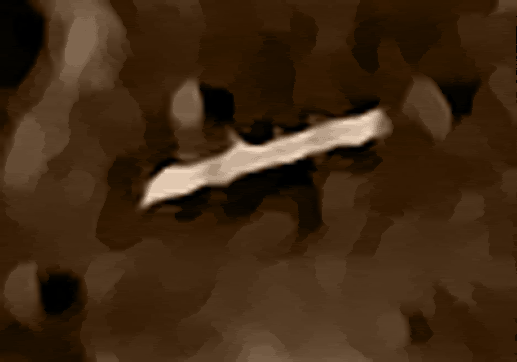
Now what the heck is that?
Cheers!
[edit on 25-9-2007 by mikesingh]
new topics
-
)A very interesting and exciting breaking news story...........
Movies: 1 hours ago -
SecretKnowledge sez howaryiz all, im back.
Introductions: 2 hours ago -
Egypt to join South Africa genocide case at ICJ
Middle East Issues: 4 hours ago -
Kingdom of the Planet of the Apes
Movies: 7 hours ago
top topics
-
Trump Record Breaking Campaign Rally 5/11 in New Jersey Draws 100,000 People
2024 Elections: 17 hours ago, 14 flags -
Biden Withholding Sensitive US Intelligence on Hamas Leaders From Israel
US Political Madness: 16 hours ago, 10 flags -
Anybody else go to the movie theater a lot? Have you noticed how dead they are?
General Chit Chat: 16 hours ago, 7 flags -
something falls in Canada
Aliens and UFOs: 17 hours ago, 5 flags -
Jean Michel and Brian May Live from Bratislava
General Chit Chat: 12 hours ago, 5 flags -
Iranian Lawmaker Declares Iran Has Nuclear Weapons
Mainstream News: 14 hours ago, 5 flags -
Egypt to join South Africa genocide case at ICJ
Middle East Issues: 4 hours ago, 3 flags -
Kingdom of the Planet of the Apes
Movies: 7 hours ago, 1 flags -
SecretKnowledge sez howaryiz all, im back.
Introductions: 2 hours ago, 1 flags -
)A very interesting and exciting breaking news story...........
Movies: 1 hours ago, 0 flags
active topics
-
REAL ID now a reality
General Conspiracies • 52 • : TheMisguidedAngel -
Iranian Lawmaker Declares Iran Has Nuclear Weapons
Mainstream News • 27 • : Asher47 -
Biden Withholding Sensitive US Intelligence on Hamas Leaders From Israel
US Political Madness • 55 • : Asher47 -
Slow moving ufo over Mexico volcano Popocatepetl 8 May 2024
Aliens and UFOs • 13 • : Asher47 -
Jean Michel and Brian May Live from Bratislava
General Chit Chat • 5 • : Cymru -
Egypt to join South Africa genocide case at ICJ
Middle East Issues • 14 • : Asher47 -
Mood Music Part VI
Music • 3178 • : Hellmutt -
A new Why Files How CRISPR and AI Destroy the World
Science & Technology • 21 • : kwaka -
SecretKnowledge sez howaryiz all, im back.
Introductions • 1 • : Freeborn -
)A very interesting and exciting breaking news story...........
Movies • 3 • : BeyondKnowledge3