It looks like you're using an Ad Blocker.
Please white-list or disable AboveTopSecret.com in your ad-blocking tool.
Thank you.
Some features of ATS will be disabled while you continue to use an ad-blocker.

Weird Moon Anomaly! A Big UFO Or Artificial Structure?
page: 8share:
Originally posted by Chorlton
Too much evidence ??
Where?
Ive seen fuzzy pics, pics of moonrocks, pics with pixelations on that people make the most remarkeable of assumptions about yet not....one....single ....piece....of......evidence.
There is, in fact, not one scrap of verifable evidence for anything on the moon other than dust, geography and rocks.
Your signature: How can we Deny Ignorance when so many people Deny Reality?
So, aren't you denying reality? Oh, well...That's a matter of perception I guess!
Cheers!
Originally posted by Brainiac
Fake.
First of all get an image with better clarity then try to smudge the image. You can easily re-make this. All you need is Microsoft Paint, a filled in Beveled square and a smudge tool from ANY photo editing software, and you 'd probably get a more believable image...
And before anyone replies, I'm an expert on this bit. I'm a computer game designer.
[edit on 9/19/2007 by Brainiac]
Not sure what you mean by "fake." The picture is indeed real, it's on a Government site. By no means did anyone put a "fake" structure in the picture via graphic software. The debate is whether or not it's a glitch/bad data or a real structure.
[edit on 21-9-2007 by wingzero93]
Originally posted by The Phantom
reply to post by Project_Silo
your welcome, if you'd like to see more convincing evidence check out the movie it came from. it should be on google video. it's called "the greatest story never told"
I think your right, Scotch Tape comes to mind. The left edge looks just like a piece of it. Im thinking this is just a careless worker more than Im thinking its anything of conspiracy value.
Originally posted by mikesingh
Your signature: How can we Deny Ignorance when so many people Deny Reality?
So, aren't you denying reality? Oh, well...That's a matter of perception I guess!
Cheers!
Ahh I see you are mastering the art of twisting meanings from your masters.... Well Done.
The REALITY is that everything you attribute to those pics that you and others post are speculation. You have no proof whatsoever of any of your speculations. THAT is the Reality.
I dont deny reality, I accept reality. I dont desperatley seek meanings to rock formations and pixelated pictures. I accept them for what they are untill proven, NOTE: PROVEN otherwise.
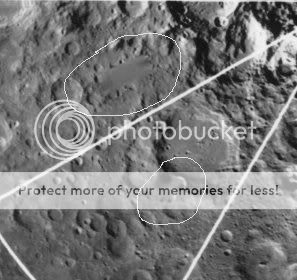
Originally posted by sherpa
Another one for the collection.
I have circled the two areas.
source link :
www.cmf.nrl.navy.mil...
Sherpa, this could really be an important find, ( Take a look here )
because the object in the pic is the same one but from a different angle.
Once we can prove that these are two differnt pics, (i mean not two pics made from the same shot)
we'll prove that someone has deliberately brushed these pics in order to hide something.
Since this object is located near south pole, we should face less troubles than with the triangle,
which sadly is located to the farside.
Thank you for your post
Now a small compilation of odd things i found casually on the web:
i have to state, before, that i find them interesting because i have no idea of what they are;
001
www.hq.nasa.gov...

002
www.hq.nasa.gov...

003
www.hq.nasa.gov...

004
www.hq.nasa.gov...

005
www.hq.nasa.gov...

006
www.hq.nasa.gov...

[edit on 21/9/2007 by internos]
internos
Here you have a crop of the "browse" version of that photo with Messier and Messier A.
This photo is available on the site that I have posted before, but that apparently nobody wants to see.
This is the same area from the full image. I changed the levels a little to make it lighter.
The colour version is only from the "browse" version, probably because all the colour versions are monochromatic but taken at different wavelenghts (and no, Zorgon, I will not say more than this ).
Bellow are links to the full images.
Browse version

Full resolution version (with some levels adjustment)

Colour version (with a little levels adjustment)

All the pictures from here.
Here you have a crop of the "browse" version of that photo with Messier and Messier A.
This photo is available on the site that I have posted before, but that apparently nobody wants to see.
This is the same area from the full image. I changed the levels a little to make it lighter.
The colour version is only from the "browse" version, probably because all the colour versions are monochromatic but taken at different wavelenghts (and no, Zorgon, I will not say more than this ).
Bellow are links to the full images.
Browse version

Full resolution version (with some levels adjustment)

Colour version (with a little levels adjustment)

All the pictures from here.
reply to post by internos
I hate to say this but I think it is from the same dataset but just orientated differently, I would like to be wrong though.
Here is an image from one of the lunar orbiters not sure which one but the point is the way the images were produced.
en.wikipedia.org...
So my interpretation of this is the image was not a mosaic but was transmited back to Earth whole hence the scan lines you can see on this image.
The image below shows a "patch" which could only have been done after it was received back on earth.
I hope my thinking is correct on this.
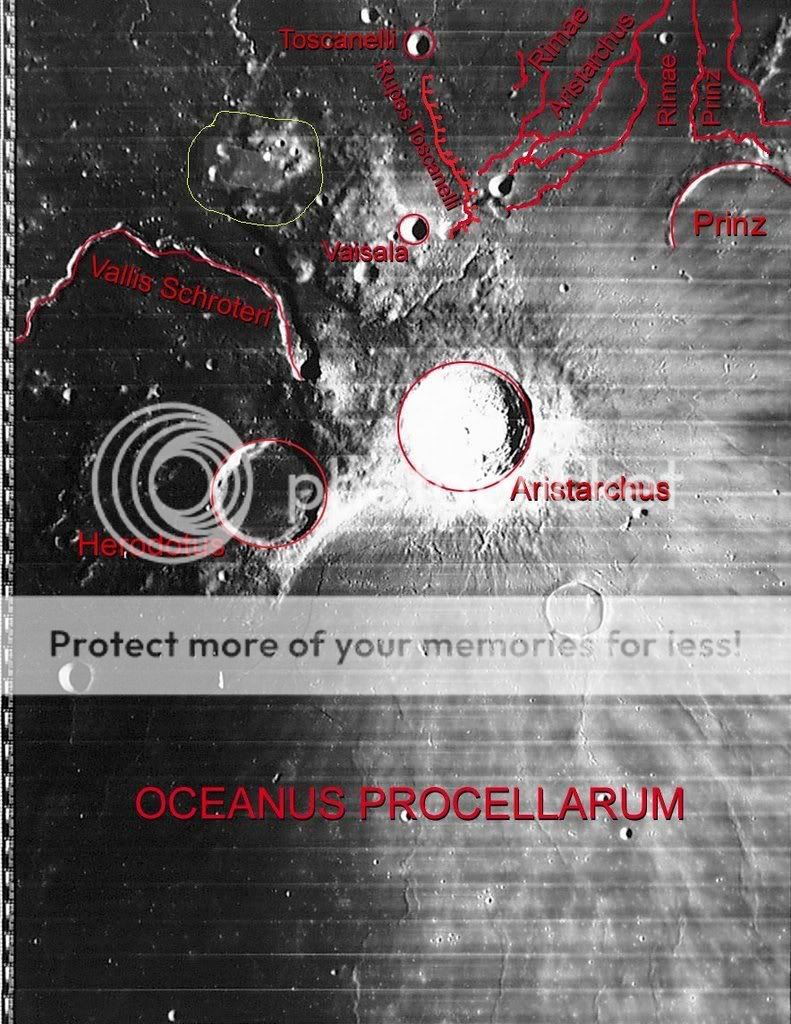
Image source:
www.lpi.usra.edu...
I hate to say this but I think it is from the same dataset but just orientated differently, I would like to be wrong though.
Here is an image from one of the lunar orbiters not sure which one but the point is the way the images were produced.
The Lunar Orbiters had an ingenious imaging system, which consisted of a dual lens camera, a film processing unit, a readout scanner, and a film handling apparatus. Both lenses, a 610 mm narrow angle high resolution (HR) lens and an 80 mm wide angle medium resolution (MR) lens, placed their frame exposures on a single roll of 70 mm film. The axes of the two cameras were coincident so the area imaged in the HR frames were centered within the MR frame areas. The film was moved during exposure to compensate for the spacecraft velocity, which was estimated by an electro-optical sensor. The film was then processed, scanned, and the images transmitted back to Earth
en.wikipedia.org...
So my interpretation of this is the image was not a mosaic but was transmited back to Earth whole hence the scan lines you can see on this image.
The image below shows a "patch" which could only have been done after it was received back on earth.
I hope my thinking is correct on this.
Image source:
www.lpi.usra.edu...
reply to post by internos
Ok image labeled 001.
I guess the interesting part about this one is the shadow, it has holes or windows in and a gap, it doesnt seem to match the object casting it although as always resolution at this level is always difficult.
002.
Strange but doesn't remind me of anything.
003.
Unusual but not a whistle blower.
004.
Again the shadow could indicate a straight vertical
005.
This in my IMHO has been edited you can just see a trace of something connecting the largest crater and the smaller crater NW of it.
The squiggle could be a hair or fibre on the negative I don't think so.
There is a lot of small retouching all over.
006.
Heavily aibrushed.
[edit on 21-9-2007 by sherpa]
Ok image labeled 001.
I guess the interesting part about this one is the shadow, it has holes or windows in and a gap, it doesnt seem to match the object casting it although as always resolution at this level is always difficult.
002.
Strange but doesn't remind me of anything.
003.
Unusual but not a whistle blower.
004.
Again the shadow could indicate a straight vertical
005.
This in my IMHO has been edited you can just see a trace of something connecting the largest crater and the smaller crater NW of it.
The squiggle could be a hair or fibre on the negative I don't think so.
There is a lot of small retouching all over.
006.
Heavily aibrushed.
[edit on 21-9-2007 by sherpa]
Originally posted by ArMaP
internos
Here you have a crop of the "browse" version of that photo with Messier and Messier A.
This photo is available on the site that I have posted before, but that apparently nobody wants to see.
Yes, now is more than clear that the "rectangle" covering messier & messier a is the result of a somehow gone badly processing, of course that picture does not reflect what actually is there, is confirmed.
I wish to ask you where can i download from that website the pics related to the area of the "triangle" ( i mean the one near J. Verne and Mare Ingegnii ). That looks to be the only area which requires further investigations, IMHO ...
I mean -30 -40 140 170 HERE
cseligman.com...
Originally posted by sherpa
reply to post by internos
Ok image labeled 001.
I guess the interesting part about this one is the shadow, it has holes or windows in and a gap, it doesnt seem to match the object casting it although as always resolution at this level is always difficult.
002.
Strange but doesn't remind me of anything.
003.
Unusual but not a whistle blower.
004.
Again the shadow could indicate a straight vertical
005.
This in my IMHO has been edited you can just see a trace of something connecting the largest crater and the smaller crater NE of it.
The squiggle could be a hair or fibre on the negative I don't think so.
There is a lot of small retouching all over.
006.
Heavily aibrushed.
sherpa
Thank you for Your opinion:
I agree for #001: shadow totally unespected, uh?
#2 looks to have something on, and it drops a shadow: no idea...
honestly it wasn't my intention to post # 3,
because it's just an optical illusion (just that triangle...but take a look at the original too)
4 & 5 interesting of couse
6 strange for a crater have something so there...
but, the odd is that are all taken from NASA website (see link above the pics) .
Are they kidding?
About the south pole area, i agree: only a new pic from a different source showing something there could make me change opinion. The thread basic pic is the triangle one: that's the most interesting, so far: if we can get somehow the sources, we'll see.
The white objects in this pic, are/were interesting for NASA employees: i've found many pics in which there were arrows pointing on there.
[edit on 21/9/2007 by internos]
Originally posted by sherpa
Another one for the collection. I have circled the two areas.
source link :
www.cmf.nrl.navy.mil...
Good find sherpa! Keep lookin'! You never know what may turn up one day - The real deal!!
Cheers
Originally posted by bigvig316
I wonder what Richard C. Hogland would say about these pics.
Who cares He has his own pics
I think there was something on the moon.
Yup Mines, colonies even the Lunar Hilton...
NASA needs to tell the truth to us once and for all.
Who will make them? They are now officially under the DoD so it will even get more secretive
Originally posted by internos
I wish to ask you where can i download from that website the pics related to the area of the "triangle" ( i mean the one near J. Verne and Mare Ingegnii ).
OK.
First you need to know the coordinates of the area you want to see. In this case I used Wikipedia to see what are the coordinates for Jules Verne crater. They are 35.0° S, 147.0° E
Knowing that, on the Clementine Online Volumes page you have to look for the volume that has the are you want. In this case it is volume cl_4032 from the "Full Resolution Clementine UVVIS Digital Image Model" section, so I clicked the blue server icon on the right of the cl_4032 label to go to that online volume.
After that we are sent to the FTP page that corresponds to the volume chosen on the server chosen (in this case the USGS server in Arizona). On that page it is easier to click on the "browse" folder, then on the "brbw.html" link that shows us a page with the photos for that volume in a browsable version.
In this case I looked for the are you wanted and I reached the conclusion that it was further East, the coordinates for Jules Verne are too much to the West of that area to be on this volume.
So I went back and selected the next volume to the East, the "cl_4038", I repeated the steps and found that one of the photos has part of the triangles seen on the other image. The image I used was the first from the left on the third row from the top, image UI31S153.IMG
Once there you can click on "Large browse image" link to see the image (but in my case it gives me a "No such file or directory" error, or you can click on the "full resolution image", which gave me a "No such file or directory" error again.
So I went back to the "cl_4038" page, selected the "data" folder and looked for the "UI31S153.IMG" file. I downloaded it and, after opening it with "The Gimp", (it can read those IMG files, they are not the old IMG file format that some image editing programs use) I converted it to a PNG file and made a smaller version of the area with the triangle.
This is from the Online Volumes, reduced in size and with some brightness and contrast changed
This is "your" image
This is the PNG made directly from the downloaded "UI31S153.IMG" file.

I forgot to add that all online CD volumes have a "locator.htm" inside of the "browse" folder, like this, where you can see what volume has the area you want.
[edit on 22/9/2007 by ArMaP]
ArMaP, thank you for your effort, yesterday i was getting crazy on it.
You've done a great work . Starred of course.
Sadly this conclusively debunks our loved triangle, because now we're talking about SOURCES and there's no way to get wrong with them IMHO.
Besides, an heavy clue was the fact that the triangle appearance was much different between the first two higher zoom levels.
It's sad, but this is the truth, so i accept it peacefully since
IMHO we have well investigated on it.

[edit on 22/9/2007 by internos]
You've done a great work . Starred of course.
Sadly this conclusively debunks our loved triangle, because now we're talking about SOURCES and there's no way to get wrong with them IMHO.
Besides, an heavy clue was the fact that the triangle appearance was much different between the first two higher zoom levels.
It's sad, but this is the truth, so i accept it peacefully since
IMHO we have well investigated on it.
[edit on 22/9/2007 by internos]
Image seems to be offline.
Cannot access at all, either in FireFox or IE.
Page does not respond, or else it times out.
Censored?
Cannot access at all, either in FireFox or IE.
Page does not respond, or else it times out.
Censored?
reply to post by internos
URGENT NEWS FLASH PLEASE READ YOUR EMAIL U2U NOW
reply to post by ArMaP
ArMaP Remeber the 'vanishing directory' of .tiffs awhile back on the Moon thread? Well it seems more have disappeared.
NASA
"The Lunar Prospector Archives is no longer operational. The assets to run these multimedia files are not available."
lunar.arc.nasa.gov...
Seems they have removed the Lunar Prospector gallery from public view.
I need help to download another directory... before it goes bye bye... I don't know if you can handle it as I cannot even get the whole list to load but I believe you have Linux? If not I can d/l by pages but there are a LOT
This goes to all Pegasus members too I will post it in the other threads.
[edit on 22-9-2007 by zorgon]
URGENT NEWS FLASH PLEASE READ YOUR EMAIL U2U NOW
reply to post by ArMaP
ArMaP Remeber the 'vanishing directory' of .tiffs awhile back on the Moon thread? Well it seems more have disappeared.
NASA
"The Lunar Prospector Archives is no longer operational. The assets to run these multimedia files are not available."
lunar.arc.nasa.gov...
Seems they have removed the Lunar Prospector gallery from public view.
I need help to download another directory... before it goes bye bye... I don't know if you can handle it as I cannot even get the whole list to load but I believe you have Linux? If not I can d/l by pages but there are a LOT
This goes to all Pegasus members too I will post it in the other threads.
[edit on 22-9-2007 by zorgon]
I dont know about you but to me it looks like Noahs Ark has been found.
Originally posted by internos
Sadly this conclusively debunks our loved triangle, because now we're talking about SOURCES and there's no way to get wrong with them IMHO.
Besides, an heavy clue was the fact that the triangle appearance was much different between the first two higher zoom levels.
It's sad, but this is the truth, so i accept it peacefully since
IMHO we have well investigated on it.
Internos, hold your horses!!
The case is not shut and closed just yet. Not until we get to know HOW that got there or WHAT the heck it is.
1. Ver. 2.0 of the Clementine browser showed up nothing there.
2. Ver. 1.5 did.
So the question is, was the anomaly removed from ver. 2.0 of the CB? If not, then what or why did that anomaly show up in the first place? What exactly was it? Tape, paper clip, spilled coffee or just a glitch? Now that is the proof I require!
Cheers
reply to post by mikesingh
Have you considered the idea that it might have been someone with a sense of humour that put it there?
'lets put something on one of the pics and see what the conspiracy people come up with'
I'd have done it, given my sense of humour
Have you considered the idea that it might have been someone with a sense of humour that put it there?
'lets put something on one of the pics and see what the conspiracy people come up with'
I'd have done it, given my sense of humour
Originally posted by mikesingh
Internos, hold your horses!!
The case is not shut and closed just yet. Not until we get to know HOW that got there or WHAT the heck it is.
1. Ver. 2.0 of the Clementine browser showed up nothing there.
2. Ver. 1.5 did.
So the question is, was the anomaly removed from ver. 2.0 of the CB? If not, then what or why did that anomaly show up in the first place? What exactly was it? Tape, paper clip, spilled coffee or just a glitch? Now that is the proof I require!
Cheers
Mike, of course about "never surrender" i agree, and you know it.
nothing has been proved and i fear that nothing will be proved about this strange case
What i meant is simple:
let's suppose that there was something there, in the source files, i mean.
Now, even if there was something, whatever it was, has been replaced.
Yesterday i donwnloaded the source: i can state that at least 15/20% of data is gone.
The pic posted by ArMaP is what you obtain by downloading the source.
img212.imageshack.us...
The browsers are a kind of interfaces which allows us to navigate through the pics, and are based on the same stock of pics, both 1.5 and 2.
A negative clue is the fact that when you zoom out from 1:1 to 1:2 the triangle shifts shape: another one is that there is a lot of transparent area in the edge of the triangle once it's set to 1:1; this shouldn't happen if there was a solid object there.
Now, notice the circled detail: it's a kind of flat rectangle @ 1:1, and it becomes a cylinder @ 1:2 -
the yellow arrows shows the "pattern" of the anomaly: this pattern is repeated to almost all the area.
And the corners of the triangle (red arrows) shifts to a different shape.

These are clues;
but is an heavy clue even the SOLID triangle which all we see there!
How many chance are there over a billion to generate randomly a shape so regular and sharp? A few / Zero. Someone has painted it or there was actually something there or something happens while switching between a res to another a zoom to another...
IMHO, the only chance that we have is to find more pics from the farside: i tried, but so far i have found only clementine-based pics.
Finding a pic in which there's the triangle not taken by Clementine would prove that there have been manipulation.
[edit on 23/9/2007 by internos]
new topics
-
Las Vegas UFO Spotting Teen Traumatized by Demon Creature in Backyard
Aliens and UFOs: 1 hours ago -
2024 Pigeon Forge Rod Run - On the Strip (Video made for you)
Automotive Discussion: 2 hours ago -
Gaza Terrorists Attack US Humanitarian Pier During Construction
Middle East Issues: 2 hours ago -
The functionality of boldening and italics is clunky and no post char limit warning?
ATS Freshman's Forum: 3 hours ago -
Meadows, Giuliani Among 11 Indicted in Arizona in Latest 2020 Election Subversion Case
Mainstream News: 4 hours ago -
Massachusetts Drag Queen Leads Young Kids in Free Palestine Chant
Social Issues and Civil Unrest: 4 hours ago -
Weinstein's conviction overturned
Mainstream News: 5 hours ago -
Supreme Court Oral Arguments 4.25.2024 - Are PRESIDENTS IMMUNE From Later Being Prosecuted.
Above Politics: 7 hours ago -
Krystalnacht on today's most elite Universities?
Social Issues and Civil Unrest: 7 hours ago -
Chris Christie Wishes Death Upon Trump and Ramaswamy
Politicians & People: 7 hours ago
top topics
-
Krystalnacht on today's most elite Universities?
Social Issues and Civil Unrest: 7 hours ago, 9 flags -
Weinstein's conviction overturned
Mainstream News: 5 hours ago, 6 flags -
University of Texas Instantly Shuts Down Anti Israel Protests
Education and Media: 10 hours ago, 6 flags -
Supreme Court Oral Arguments 4.25.2024 - Are PRESIDENTS IMMUNE From Later Being Prosecuted.
Above Politics: 7 hours ago, 5 flags -
Massachusetts Drag Queen Leads Young Kids in Free Palestine Chant
Social Issues and Civil Unrest: 4 hours ago, 4 flags -
Meadows, Giuliani Among 11 Indicted in Arizona in Latest 2020 Election Subversion Case
Mainstream News: 4 hours ago, 4 flags -
Chris Christie Wishes Death Upon Trump and Ramaswamy
Politicians & People: 7 hours ago, 2 flags -
Any one suspicious of fever promotions events, major investor Goldman Sachs card only.
The Gray Area: 12 hours ago, 2 flags -
Gaza Terrorists Attack US Humanitarian Pier During Construction
Middle East Issues: 2 hours ago, 2 flags -
2024 Pigeon Forge Rod Run - On the Strip (Video made for you)
Automotive Discussion: 2 hours ago, 1 flags
active topics
-
Cats Used as Live Bait to Train Ferocious Pitbulls in Illegal NYC Dogfighting
Social Issues and Civil Unrest • 22 • : NoviceStoic4 -
Supreme Court Oral Arguments 4.25.2024 - Are PRESIDENTS IMMUNE From Later Being Prosecuted.
Above Politics • 64 • : matafuchs -
Sunak spinning the sickness figures
Other Current Events • 22 • : angelchemuel -
Massachusetts Drag Queen Leads Young Kids in Free Palestine Chant
Social Issues and Civil Unrest • 10 • : Cre8chaos79 -
Nearly 70% Of Americans Want Talks To End War In Ukraine
Political Issues • 93 • : Xtrozero -
University of Texas Instantly Shuts Down Anti Israel Protests
Education and Media • 194 • : Irishhaf -
Fossils in Greece Suggest Human Ancestors Evolved in Europe, Not Africa
Origins and Creationism • 88 • : Xtrozero -
Gaza Terrorists Attack US Humanitarian Pier During Construction
Middle East Issues • 20 • : Justsomeboreddude3 -
Thousands Of Young Ukrainian Men Trying To Flee The Country To Avoid Conscription And The War
Other Current Events • 141 • : Consvoli -
Terrifying Encounters With The Black Eyed Kids
Paranormal Studies • 77 • : burritocat