It looks like you're using an Ad Blocker.
Please white-list or disable AboveTopSecret.com in your ad-blocking tool.
Thank you.
Some features of ATS will be disabled while you continue to use an ad-blocker.

Avatar upload: Step by step instructions with pictures (2012)
page: 1share:
I've been seeing a lot of new members having problems with their avatars and asking for help.
So I thought it would be a good idea to make an up to date thread with step by step instructions and pictures to make the process easier. (I thought it'd be good to have it in a thread of its own instead of having to post this as a reply in every thread)
First:
Size requirements:
New Rules for Avatars and Mini-Profile Backgrounds
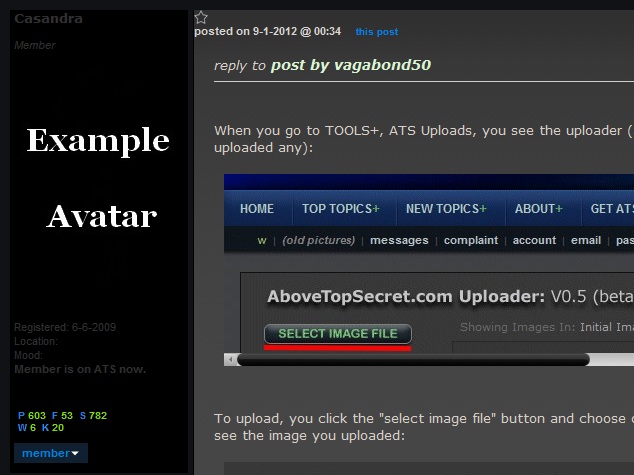
When you go to TOOLS+, ATS Uploads, you see the uploader (and the images, if you have previously uploaded any):

To upload, you click the "select image file" button and choose one from your computer. Now you can see the image you uploaded:
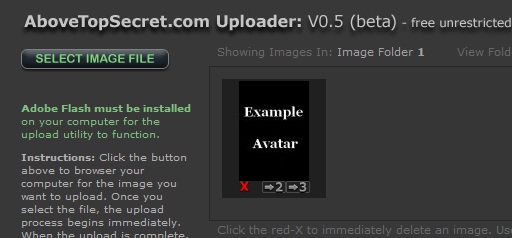
Click on the image you want and you'll see this open up in another window:
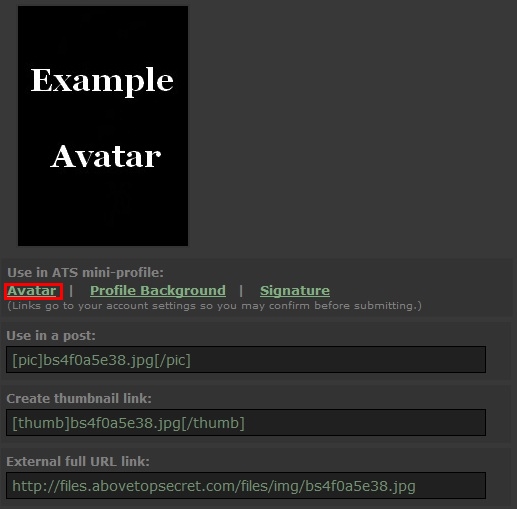
Here you can choose what you want to use it for.
If you click on Avatar, it will take you to your profile, where you can change the settings:
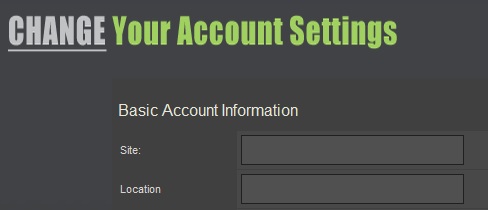
Scroll down and you'll find the Avatar option:
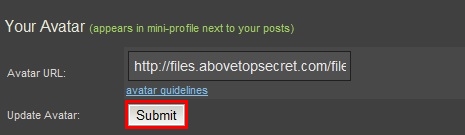
Choose submit (remember about the size rules) and it should show the avatar:
I hope it helps
The 5/3 Upgrade Avatar upload thread:
www.abovetopsecret.com...
So I thought it would be a good idea to make an up to date thread with step by step instructions and pictures to make the process easier. (I thought it'd be good to have it in a thread of its own instead of having to post this as a reply in every thread)
First:
Size requirements:
Avatars Maximum pixel dimensions: 170 pixels wide by 240 pixels high.
Maximum file size: Remains 75k
New Rules for Avatars and Mini-Profile Backgrounds
When you go to TOOLS+, ATS Uploads, you see the uploader (and the images, if you have previously uploaded any):
To upload, you click the "select image file" button and choose one from your computer. Now you can see the image you uploaded:
Click on the image you want and you'll see this open up in another window:
Here you can choose what you want to use it for.
If you click on Avatar, it will take you to your profile, where you can change the settings:
Scroll down and you'll find the Avatar option:
Choose submit (remember about the size rules) and it should show the avatar:
I hope it helps
The 5/3 Upgrade Avatar upload thread:
www.abovetopsecret.com...
edit on Sun Jan 5 2014 by DontTreadOnMe because: (no reason given)
thanks alot pal it worked a treat.......... ive been trying 4 ages
reply to post by nofear39
You're welcome
I remember when I was uploading my avatar for the first time, the system was different then but I still had problems. Sometimes you follow instructions and they don't show up anyway, that happens when the avatar is too big, so you always have to make sure the size requirements are met.
You're welcome
I remember when I was uploading my avatar for the first time, the system was different then but I still had problems. Sometimes you follow instructions and they don't show up anyway, that happens when the avatar is too big, so you always have to make sure the size requirements are met.
edit on 5-3-2012 by Casandra because: (no reason given)
reply to post by Casandra
and my pic must be the wrong size because its only showing the top half can ya explain plz pal
and my pic must be the wrong size because its only showing the top half can ya explain plz pal

reply to post by Casandra
Oh thank you, OP! I have such a pathetic success rate with uploading graphics over the last year. But this thread presents a challenge for me which I'll take on again, with your most welcomed assistance. So I can't tell you how much I appreciate this thread.
I do have two questions I hope someone can answer:
1. I found a picture on a weather site where people were invited to upload their photos. I'm not confident about the copyright laws anymore. I know who took the photo I'd like, but I don't have contact info to ask for permission to use it as an avatar. Would it be ok to use it and credit the person in the signature line?
2. On my account page, I have clicked on the option to hide avatars. Does this mean others cannot see my avatar next to my posts too, or just me?
Oh thank you, OP! I have such a pathetic success rate with uploading graphics over the last year. But this thread presents a challenge for me which I'll take on again, with your most welcomed assistance. So I can't tell you how much I appreciate this thread.
I do have two questions I hope someone can answer:
1. I found a picture on a weather site where people were invited to upload their photos. I'm not confident about the copyright laws anymore. I know who took the photo I'd like, but I don't have contact info to ask for permission to use it as an avatar. Would it be ok to use it and credit the person in the signature line?
2. On my account page, I have clicked on the option to hide avatars. Does this mean others cannot see my avatar next to my posts too, or just me?
reply to post by aboutface
I'm not sure about your first question, so I can't say if it'd be ok or not. But the "hide avatar" option works just for you, so you won't be seeing other member's avatars, but they will be able to see yours.
I'm not sure about your first question, so I can't say if it'd be ok or not. But the "hide avatar" option works just for you, so you won't be seeing other member's avatars, but they will be able to see yours.
reply to post by Casandra
Thanks for your reply, I just had to make sure.
So much for the premiss in Hitchhiker's Guide to the Galaxy that if we can't see them, they can't see us, eh?
Thanks for your reply, I just had to make sure.
So much for the premiss in Hitchhiker's Guide to the Galaxy that if we can't see them, they can't see us, eh?
reply to post by aboutface
Ahhhh, success finally! I discovered that my problem lies with Paint and not with the upload feature. Hope you like the new avatar.
My gratitude goes to Kat Shroeder for the photograph of a redtail hawk.
Ahhhh, success finally! I discovered that my problem lies with Paint and not with the upload feature. Hope you like the new avatar.
My gratitude goes to Kat Shroeder for the photograph of a redtail hawk.
Mini Profile Background
If the size limitations seem a bit small to you, you can use a background image instead. You upload an "empty" image so the text in the profile is pushed down and you can use the whole space.
Size requirements:
New Rules for Avatars and Mini-Profile Backgrounds
Instructions:
1) Put this link: files.abovetopsecret.com... in the "Avatar" section on your profile. (The size is 170X240)
2) Upload the image you want as background:
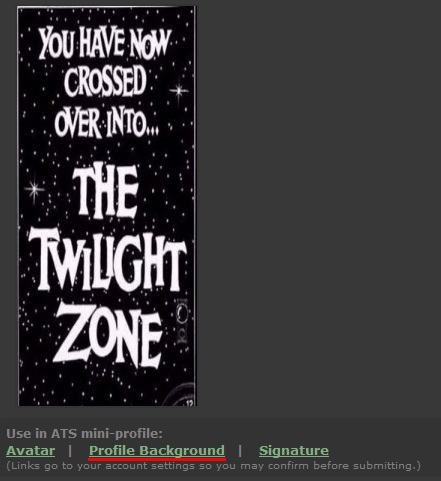
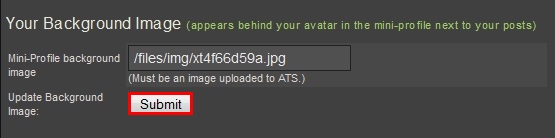
Click on it and (when the new window opens up) select "Profile Background". It will take you to your profile, scroll down until you see the "Your Background Image" option and click submit:
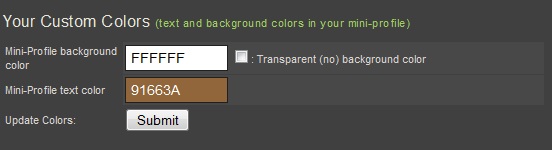
3) Make sure your username is readable. You can choose the font color:
Now you have a background image
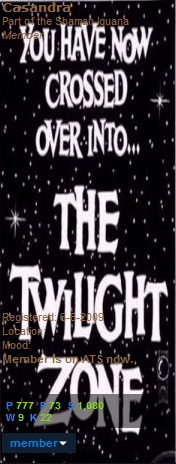
If the size limitations seem a bit small to you, you can use a background image instead. You upload an "empty" image so the text in the profile is pushed down and you can use the whole space.
Size requirements:
Pixel Space: 180 pixels wide and 400-480 pixels tall
Maximum Pixel Dimensions: 200 pixels wide by 700 pixels tall.
Maximum File Size: 100k if you're using a clear-GIF as your avatar, if not, the combined file size of your avatar and background image cannot exceed 150k.
New Rules for Avatars and Mini-Profile Backgrounds
Instructions:
1) Put this link: files.abovetopsecret.com... in the "Avatar" section on your profile. (The size is 170X240)
2) Upload the image you want as background:
Click on it and (when the new window opens up) select "Profile Background". It will take you to your profile, scroll down until you see the "Your Background Image" option and click submit:
3) Make sure your username is readable. You can choose the font color:
Now you have a background image
I'm sorry if this bothers anyone, but I'm a bit new to this and I didn't know any other way to check and see if my signature quote was appearing or
not unless I posted. This is merely just to see if it appears. If there's an easier way to know, then don't hesitate to tell me. I need all the help
I can get.
This, as much or more than anything else, is what keeps me coming back and spending time on ATS
Community
What an outstanding thread from an outstanding Member
Community
What an outstanding thread from an outstanding Member
reply to post by XxForgottenLegendxX
It's ok. When I wanted to check if my signature was working, I'd open in a new tab an old post (I see you're new, so maybe one on your introduction thread) and refresh it when I made any changes to the signature, to see if it looked the way I wanted it too.
I did the same when I was testing this avatar / background image method to see if it worked as I wrote it, I'd refresh and old post to see how it looked.
I must have looked like a lunatic changing my mini profile every 2 minutes
I don't think it would be wrong if members posted here their doubts, it's what the thread is for, to try and help each other
reply to post by semperfortis

It's ok. When I wanted to check if my signature was working, I'd open in a new tab an old post (I see you're new, so maybe one on your introduction thread) and refresh it when I made any changes to the signature, to see if it looked the way I wanted it too.
I did the same when I was testing this avatar / background image method to see if it worked as I wrote it, I'd refresh and old post to see how it looked.
I must have looked like a lunatic changing my mini profile every 2 minutes
I don't think it would be wrong if members posted here their doubts, it's what the thread is for, to try and help each other
reply to post by semperfortis
edit on 20-3-2012 by Casandra because: (no reason given)
reply to post by Casandra
appreciate the thread casandra.
still struggling with re-sizing an image for avatar/background. folders don't seem to want to delete existing mess-ups. any tips? btw the image is jpg and well under required kb limit.
regards fakedirt.
appreciate the thread casandra.
still struggling with re-sizing an image for avatar/background. folders don't seem to want to delete existing mess-ups. any tips? btw the image is jpg and well under required kb limit.
regards fakedirt.
reply to post by fakedirt
To delete an uploaded image, click on the red X at the bottom:
You could post the image here, if you want, like nofear39 did some posts above.
I'll re-size it, try it and if it works I'll post it back here
To delete an uploaded image, click on the red X at the bottom:
You could post the image here, if you want, like nofear39 did some posts above.
I'll re-size it, try it and if it works I'll post it back here
edit on 20-3-2012 by Casandra because: (no reason given)
reply to post by Casandra
i've attempted to delete images not needed and it seems the system freezes during the process. it's the same with the upload. i am in no particular hurry on this so i will satisfy the problem is not on my end first.
thanks for the response casandra.
f
i've attempted to delete images not needed and it seems the system freezes during the process. it's the same with the upload. i am in no particular hurry on this so i will satisfy the problem is not on my end first.
thanks for the response casandra.
f
Signature
Size requirements:
Signature Guidelines
Ok, for this there's a long way and a short way.
Short way:
1) Upload the image, click on it and when the options appear, select "Use in a Post" and copy the link.
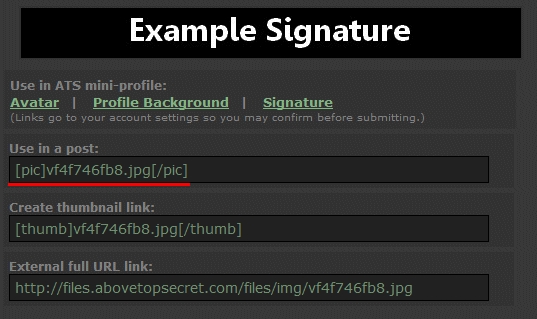
2) Go to your Account Settings and scroll down until you find the option "Your Signature" and paste the link there:
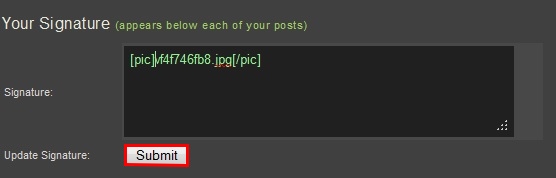
Click "submit".
Long way:
1) Upload the image, click on it and when the options appear, select "Signature".
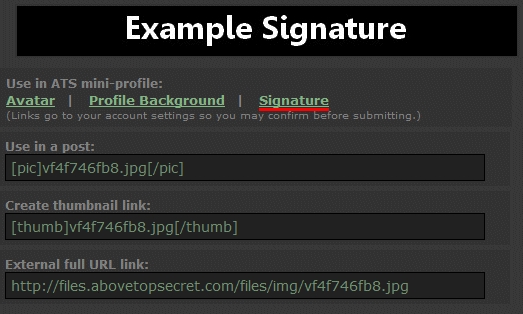
2) It will take you to "Your Signature" options on your profile. Now, here you get the whole link but you only need the image name:
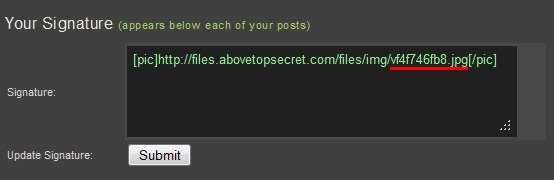
3) Delete the rest and click submit:
And now you have a signature image:

I know the long way doesn't really seem that long, I just put it here so we can see what happens when you click on the "Signature" option, and why you don't really have to.
Size requirements:
No larger than 600 pixels wide by 70 pixels tall.
Maximum file size of 50kb.
Signature Guidelines
Ok, for this there's a long way and a short way.
Short way:
1) Upload the image, click on it and when the options appear, select "Use in a Post" and copy the link.
2) Go to your Account Settings and scroll down until you find the option "Your Signature" and paste the link there:
Click "submit".
Long way:
1) Upload the image, click on it and when the options appear, select "Signature".
2) It will take you to "Your Signature" options on your profile. Now, here you get the whole link but you only need the image name:
3) Delete the rest and click submit:
And now you have a signature image:
I know the long way doesn't really seem that long, I just put it here so we can see what happens when you click on the "Signature" option, and why you don't really have to.
edit on 29-3-2012 by Casandra because: (no reason given)
new topics
-
Hard evidence of a Royal plot on the US....if only i had proof.
ATS Skunk Works: 50 minutes ago -
Do you name your cars ?
General Chit Chat: 1 hours ago -
Jim Biden Was in Business with Qatari Officials
US Political Madness: 3 hours ago -
I may have had a talk with Pope Francis about his plans for our nation
The Gray Area: 4 hours ago -
Sleep paralysis and the implantation of some weird Matrix-esque demon creature...
The Gray Area: 5 hours ago -
Say his name
US Political Madness: 5 hours ago -
There is no such thing as moonlight.
General Chit Chat: 6 hours ago -
5 probed after 18-year old girl dies as a result of having the COVID jab
Diseases and Pandemics: 7 hours ago -
Official denial
Diseases and Pandemics: 10 hours ago -
MEGA - Let's Make Europe Great Again
Other Current Events: 10 hours ago
top topics
-
5 probed after 18-year old girl dies as a result of having the COVID jab
Diseases and Pandemics: 7 hours ago, 17 flags -
Say his name
US Political Madness: 5 hours ago, 14 flags -
Jim Biden Was in Business with Qatari Officials
US Political Madness: 3 hours ago, 12 flags -
Official denial
Diseases and Pandemics: 10 hours ago, 10 flags -
MEGA - Let's Make Europe Great Again
Other Current Events: 10 hours ago, 7 flags -
Sleep paralysis and the implantation of some weird Matrix-esque demon creature...
The Gray Area: 5 hours ago, 7 flags -
I may have had a talk with Pope Francis about his plans for our nation
The Gray Area: 4 hours ago, 6 flags -
Psychotronic Operation Rwanda Who Wants To Be A Refugee?
ATS Skunk Works: 11 hours ago, 6 flags -
Hamas and Other Islamist Terrorist Groups Announce Support of US Campus Anti-Israel Protests
Education and Media: 11 hours ago, 6 flags -
There is no such thing as moonlight.
General Chit Chat: 6 hours ago, 5 flags
active topics
-
Jim Biden Was in Business with Qatari Officials
US Political Madness • 33 • : CarlLaFong -
MEGA - Let's Make Europe Great Again
Other Current Events • 35 • : yeahright -
-@TH3WH17ERABB17- -Q- ---TIME TO SHOW THE WORLD--- -Part- --44--
Dissecting Disinformation • 720 • : Thoughtful3 -
Post A Funny (T&C Friendly) Pic Part IV: The LOL awakens!
General Chit Chat • 7140 • : ntech620 -
Australian PM says the quiet part out loud - "free speech is a threat to democratic dicourse"...?!
New World Order • 15 • : NoCorruptionAllowed -
Evolution is a product of encoded information not anything natural
Origins and Creationism • 95 • : Lochid -
So this is what Hamas considers 'freedom fighting' ...
War On Terrorism • 279 • : FlyersFan -
Say his name
US Political Madness • 29 • : ntech620 -
Biden "Happy To Debate Trump"
2024 Elections • 77 • : JadedGhost -
5 probed after 18-year old girl dies as a result of having the COVID jab
Diseases and Pandemics • 17 • : NoCorruptionAllowed