It looks like you're using an Ad Blocker.
Please white-list or disable AboveTopSecret.com in your ad-blocking tool.
Thank you.
Some features of ATS will be disabled while you continue to use an ad-blocker.

How to resize an image
page: 1share:
I quite often come across posts which include images within them that are enormous, and result in the page being misshaped , and the need to scroll
the screen from left to right to read the posts in them.
It would be really helpful if people could be aware of this before adding images to posts.
There is however a really simple solution to the problem, which is to add a little code to resize your image.
I'll use a picture of my friendly kitty to show you how.

if you right click the image and then click on properties, you can tell how many pixels high and wide the image is.
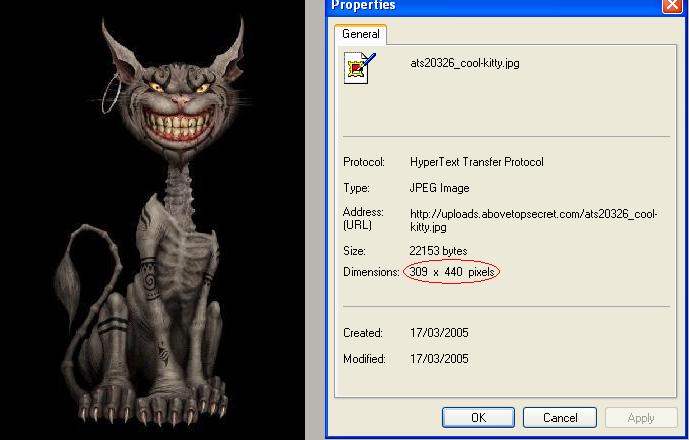
Now to make my image smaller.
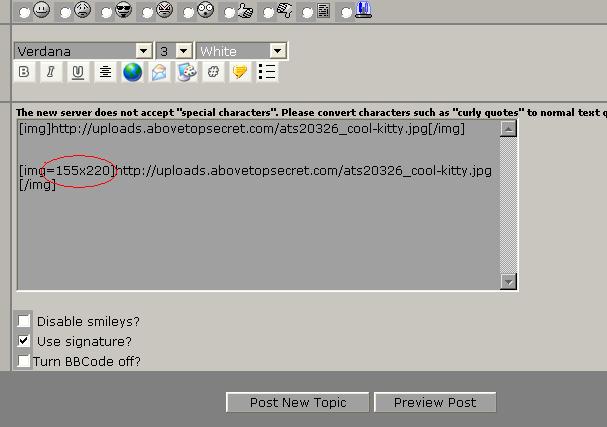
To reduce the size by half, I need to halve the values of my dimensions to 155x 220 pixels, which I can do by simply adding the values into the code used to insert an image. You can see where it is added in the image below.
The first line would be for my full sized image, and the second which includes the added code (=155x220) will produce my half sized picture.
hey presto, here is my half sized kitty
external image
pretty easy right? You just have to be sure to keep the height x width ratio correct when you reduce your image so that you don't end up with something like this
external image
and it's also a good idea to use the preview post option before adding your post to the board to see the results of your resizing.
[edit on 16-3-2005 by pantha]
It would be really helpful if people could be aware of this before adding images to posts.
There is however a really simple solution to the problem, which is to add a little code to resize your image.
I'll use a picture of my friendly kitty to show you how.
if you right click the image and then click on properties, you can tell how many pixels high and wide the image is.
Now to make my image smaller.
To reduce the size by half, I need to halve the values of my dimensions to 155x 220 pixels, which I can do by simply adding the values into the code used to insert an image. You can see where it is added in the image below.
The first line would be for my full sized image, and the second which includes the added code (=155x220) will produce my half sized picture.
hey presto, here is my half sized kitty
external image
pretty easy right? You just have to be sure to keep the height x width ratio correct when you reduce your image so that you don't end up with something like this
external image
and it's also a good idea to use the preview post option before adding your post to the board to see the results of your resizing.
[edit on 16-3-2005 by pantha]
Great stuff!
this will be a great help to alot of members,
Thanks pantha
this will be a great help to alot of members,
Thanks pantha
Great tip! That's a new way to resize images using BB code that I was completely unaware of
[edit on 3/17/2005 by EnronOutrunHomerun]
[edit on 3/17/2005 by EnronOutrunHomerun]
I had always wondered if bbcode gave you enough control to do that? Now I know. THanks pantha.
With all and useful information being provided by the mods lately, I hope someone takes the time to assemble it into a handy dandy little new user / FAQ guide.
With all and useful information being provided by the mods lately, I hope someone takes the time to assemble it into a handy dandy little new user / FAQ guide.
I take it this works with any image? Even ones hosted elsewhere?
Will give it a try. Thanks for the tip.
Here kitty, kitty... (D'oh) Oh that's OK, I didn't need that finger for anything.
Will give it a try. Thanks for the tip.
Here kitty, kitty... (D'oh) Oh that's OK, I didn't need that finger for anything.
ahhhh I take it you missed the warning sign
to answer your question, yes , this works for images that are hosted offsite too
to answer your question, yes , this works for images that are hosted offsite too
Gosh... that is hundred times easier than the way I have been doing it.
Thank you
[edit on 17-3-2005 by Event Horizon]
Thank you
[edit on 17-3-2005 by Event Horizon]
external imageexternal image
Hey, it works. I didn´t know this way of resizing pics in posts. Thanks.
Any complete list of BB-codes that works on ATS available anywhere around?
Hey, it works. I didn´t know this way of resizing pics in posts. Thanks.
Any complete list of BB-codes that works on ATS available anywhere around?
Whoa, I didn't realize that you can control image size thru the board code. that is pretty helpful.
Originally posted by Hellmutt
Any complete list of BB-codes that works on ATS available anywhere around?
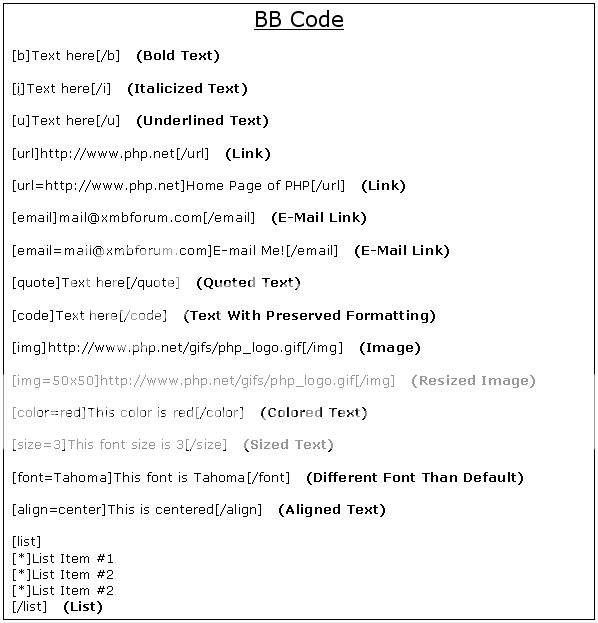
There is a thread on ATS somewhere but here is some BBcode I turned into an image file.
Originally posted by kinglizard
There is a thread on ATS somewhere...
...and here it is... www.belowtopsecret.com...
It's found under FAQ » Misc Questions. Enjoy.
[STAY COOL)
-prophetmike
Originally posted by prophetmike
here it is... www.belowtopsecret.com...
It's found under FAQ » Misc Questions. Enjoy.
Nice find prophetmike. I looked everywhere for that FAQ thread. Thanks bud...
Also if your running the famous you should download this tool:
www.microsoft.com...
there is a link on the right hand size for a program called image resizer, when you open any image in preview mode just right click on the image and click resize
as easy as that lol
[edit on 30-3-2005 by DJDOHBOY]
www.microsoft.com...
there is a link on the right hand size for a program called image resizer, when you open any image in preview mode just right click on the image and click resize
as easy as that lol
[edit on 30-3-2005 by DJDOHBOY]
Actually, when you talk about reducing the size of your picture, halving each dimension does not make your picture half the AREA, it reduces the
picture to one-fourth the size (in pixels, of course).
309 X 440 pixels equal 135,960 pixels. Halving each dimension to 155 X 220 pixels gives you 31,400 pixels, which is one-fourth the size of the original picture. If you wanted to cut a pictures size in half, you’d divide each side by 1.414. For example, your original picture, if the dimensions were divided by 1.414, would go from 309 X 440 to 219 X 311, or a total of 64,999 pixels.
309 X 440 pixels equal 135,960 pixels. Halving each dimension to 155 X 220 pixels gives you 31,400 pixels, which is one-fourth the size of the original picture. If you wanted to cut a pictures size in half, you’d divide each side by 1.414. For example, your original picture, if the dimensions were divided by 1.414, would go from 309 X 440 to 219 X 311, or a total of 64,999 pixels.
yeah , what he said!
Actually you make a very good point there, and looking back it's really obvious too , maths never was my strong point
Actually you make a very good point there, and looking back it's really obvious too , maths never was my strong point
pantha said:
Thank you!! Does this mean you will have Netchicken or Simon send me the Administrator's Magic Password as a reward?
Actually you make a very good point there...
Thank you!! Does this mean you will have Netchicken or Simon send me the Administrator's Magic Password as a reward?
external image
trying to resize my image....
originally: 64x64=4,096
resized: 100x100=10,000
here goes nothing
looks bad IMO too fake or something.....if I wanted to change it in my profile, what do I do now.
[edit on 3-5-2005 by Rren]
trying to resize my image....
originally: 64x64=4,096
resized: 100x100=10,000
here goes nothing
looks bad IMO too fake or something.....if I wanted to change it in my profile, what do I do now.
[edit on 3-5-2005 by Rren]
Originally posted by Rren
looks bad IMO too fake or something.....if I wanted to change it in my profile, what do I do now.
Well, yeah. When you make something smaller, it'll look fine because you don't loose anything. When you shrink it, however, you've got a problem. Take your image. To begin with, it has 4,096 different pixels colored in. When you bump it up to 10k, there's still only the original 4,096, so they each get bigger.
For your profile, you've got to make a different picture. This is just a means of manipulating an image within a post, it doesn't actually change the image.
new topics
-
Falkville Robot-Man
Aliens and UFOs: 11 minutes ago -
James O’Keefe: I have evidence that exposes the CIA, and it’s on camera.
Whistle Blowers and Leaked Documents: 54 minutes ago -
Australian PM says the quiet part out loud - "free speech is a threat to democratic dicourse"...?!
New World Order: 1 hours ago -
Ireland VS Globalists
Social Issues and Civil Unrest: 2 hours ago -
Biden "Happy To Debate Trump"
Mainstream News: 2 hours ago -
RAAF airbase in Roswell, New Mexico is on fire
Aliens and UFOs: 2 hours ago -
What is the white pill?
Philosophy and Metaphysics: 4 hours ago -
Mike Pinder The Moody Blues R.I.P.
Music: 5 hours ago -
Putin, Russia and the Great Architects of the Universe
ATS Skunk Works: 8 hours ago
top topics
-
A Warning to America: 25 Ways the US is Being Destroyed
New World Order: 12 hours ago, 21 flags -
Biden "Happy To Debate Trump"
Mainstream News: 2 hours ago, 7 flags -
Mike Pinder The Moody Blues R.I.P.
Music: 5 hours ago, 7 flags -
What is the white pill?
Philosophy and Metaphysics: 4 hours ago, 5 flags -
Australian PM says the quiet part out loud - "free speech is a threat to democratic dicourse"...?!
New World Order: 1 hours ago, 5 flags -
RAAF airbase in Roswell, New Mexico is on fire
Aliens and UFOs: 2 hours ago, 4 flags -
Putin, Russia and the Great Architects of the Universe
ATS Skunk Works: 8 hours ago, 3 flags -
Ireland VS Globalists
Social Issues and Civil Unrest: 2 hours ago, 3 flags -
James O’Keefe: I have evidence that exposes the CIA, and it’s on camera.
Whistle Blowers and Leaked Documents: 54 minutes ago, 3 flags -
Falkville Robot-Man
Aliens and UFOs: 11 minutes ago, 1 flags
active topics
-
Biden "Happy To Debate Trump"
Mainstream News • 33 • : YourFaceAgain -
Falkville Robot-Man
Aliens and UFOs • 3 • : KKLOCO -
University of Texas Instantly Shuts Down Anti Israel Protests
Education and Media • 296 • : KrustyKrab -
Krystalnacht on today's most elite Universities?
Social Issues and Civil Unrest • 10 • : xuenchen -
Russia Ukraine Update Thread - part 3
World War Three • 5736 • : YourFaceAgain -
Candidate TRUMP Now Has Crazy Judge JUAN MERCHAN After Him - The Stormy Daniels Hush-Money Case.
Political Conspiracies • 794 • : Threadbarer -
Manor Lords - Medieval City Builder with RTS Combat - Early Access 26th April
Video Games • 7 • : gortex -
"We're All Hamas" Heard at Columbia University Protests
Social Issues and Civil Unrest • 289 • : FlyersFan -
Las Vegas UFO Spotting Teen Traumatized by Demon Creature in Backyard
Aliens and UFOs • 17 • : rickymouse -
James O’Keefe: I have evidence that exposes the CIA, and it’s on camera.
Whistle Blowers and Leaked Documents • 7 • : pianopraze