It looks like you're using an Ad Blocker.
Please white-list or disable AboveTopSecret.com in your ad-blocking tool.
Thank you.
Some features of ATS will be disabled while you continue to use an ad-blocker.

Please tell me how to post pictures
page: 1share:
Can anyone please tell me,in simple layman terms,how to post pictures & YouTube videos that can be seen on the screen.So far,I've only been able to
paste links.I want the pictures to be there to see.
Your help would be much appreciated.
Peace
Your help would be much appreciated.
Peace
Set of buttons when you post, look for the one called "Image" they are in blue and have headers such as HEADLINE, BOLD, ITALIC
They are above where you write your comment/posts on the same page as the smileys!
They are above where you write your comment/posts on the same page as the smileys!
edit on 15-1-2011 by WeMoveUnseen because: Because im
thick.
reply to post by youngdrodeau
for pictures, upload the picture to a site like Photobucket, or use the URL it already has, if the URL is unique to the picture - then use the "image" tab above the "post" field and cut and paste the image URL there.
For youtube vids, click the "share" tab on the youtube vid, then copy everything after the "=" in that link and paste it into the "vid:youtube" window that pops up.
~Heff
for pictures, upload the picture to a site like Photobucket, or use the URL it already has, if the URL is unique to the picture - then use the "image" tab above the "post" field and cut and paste the image URL there.
For youtube vids, click the "share" tab on the youtube vid, then copy everything after the "=" in that link and paste it into the "vid:youtube" window that pops up.
~Heff
left click on your mouse actually do pretty well
i have something ready for the youtube videos help..hope its good
[atsimg]http://files.abovetopsecret.com/images/member/fed5fbac03d4.jpg[/atsimg]
i have something ready for the youtube videos help..hope its good
[atsimg]http://files.abovetopsecret.com/images/member/fed5fbac03d4.jpg[/atsimg]
Here is an excellent guide for all pics and vids covering all questions: All You'll Ever Need -
ATS Media Guide Step By Step
spec
ATS Media Guide Step By Step
spec
edit on 15-1-2011 by speculativeoptimist because: (no reason given)
I'll assume you know how to 'save' a photo so here...................very simple:
Go to tinypic.com...
Find and upload your photo then copy the link that I've circled

and just paste it in post. No need to click on any commands on ATS.
Let me know if I can help further
Go to tinypic.com...
Find and upload your photo then copy the link that I've circled
and just paste it in post. No need to click on any commands on ATS.
Let me know if I can help further
reply to post by youngdrodeau
At the top of the screen, you will see a blue menu. Click on "Tools", and then click on "Pictures" in the submenu. On the left of your page you should see a green hyperlink saying "Upload picture" - click on it. Enter a caption and description, then click on the Browse button - find your picture, and then click on the green upload button.
Once the image is loaded you will see a thumbnail of it - click on the thumbnail. Below the picture you will see 3 links - select all the text in the bottom one (Embed on ATS), and copy and paste that text into the thread where you want your image to appear - and Voila!!
For YT Videos - when you are typing your post, you will see a "Vid: Youtube" command button amongst a number of options above the post - click on it. A window will appear. In this window ONLY enter whatever appears after the "=" on the YT. Done. Just like the photo, wherever you do this, it will appear in your post.
Hope that helps
At the top of the screen, you will see a blue menu. Click on "Tools", and then click on "Pictures" in the submenu. On the left of your page you should see a green hyperlink saying "Upload picture" - click on it. Enter a caption and description, then click on the Browse button - find your picture, and then click on the green upload button.
Once the image is loaded you will see a thumbnail of it - click on the thumbnail. Below the picture you will see 3 links - select all the text in the bottom one (Embed on ATS), and copy and paste that text into the thread where you want your image to appear - and Voila!!
For YT Videos - when you are typing your post, you will see a "Vid: Youtube" command button amongst a number of options above the post - click on it. A window will appear. In this window ONLY enter whatever appears after the "=" on the YT. Done. Just like the photo, wherever you do this, it will appear in your post.
Hope that helps
Originally posted by heineken
left click on your mouse actually do pretty well
i have something ready for the youtube videos help..hope its good
[atsimg]http://files.abovetopsecret.com/images/member/fed5fbac03d4.jpg[/atsimg]
Yeah YouTube is a bit tricky.
Don't forget to add
I can't even show you without making a YouTube come up.
Too funny.
Here, let's try it this way. Add ------------------------> [yvid]
edit on 15-1-2011 by Human_Alien because: (no reason given)
although i like clickable thumbs from photobucket best, the easiest wasy on ats is to upload photo from your pc onto your ats 'pictures' page, click
your pic, scroll down and copy the url for 'embed on ats'.
and youtube just copy the bit after the =
edit: or just read all of the above posts
edit2: or just spend 2 mins looking at the easy to find ats help threads they kindly provided for us
and youtube just copy the bit after the =
edit: or just read all of the above posts
edit on 15-1-2011 by neonitus because: (no reason given)
edit2: or just spend 2 mins looking at the easy to find ats help threads they kindly provided for us
edit on 15-1-2011 by neonitus
because: (no reason given)
reply to post by youngdrodeau
I find this method the easiest. Firstly save the image you want to post to your hard drive. THEN:
On ATS:
Click on TOOLS.
Click on PICTURES
Click UPLOAD PHOTO
Click BROWSE
Find the image you want, press OPEN, then simply click ADD PHOTO.
The photo will appear in your album
Now CLICK on the PHOTO and the image will appear with three option under it, one is "EMBED on ATS", copy and paste the link in the box into your post and the picture will appear.
Voila!!
As for YT vids, just copy everything after the = sign, then click the VD YOUTUBE icon above your post and paste the code, just press OK and it's done!
I find this method the easiest. Firstly save the image you want to post to your hard drive. THEN:
On ATS:
Click on TOOLS.
Click on PICTURES
Click UPLOAD PHOTO
Click BROWSE
Find the image you want, press OPEN, then simply click ADD PHOTO.
The photo will appear in your album
Now CLICK on the PHOTO and the image will appear with three option under it, one is "EMBED on ATS", copy and paste the link in the box into your post and the picture will appear.
Voila!!
As for YT vids, just copy everything after the = sign, then click the VD YOUTUBE icon above your post and paste the code, just press OK and it's done!
Originally posted by youngdrodeau
Can anyone please tell me,in simple layman terms,how to post.......YouTube videos
Here is a YT tut I made, hope it helps.
[atsimg]http://files.abovetopsecret.com/images/member/de5ae3a7022a.jpg[/atsimg]
i think you need to upload your pics before you post them here.

[img]http://[IMG]http://i1067.photobucket.com/albums/u424/phoenix07140/9dd68ebf.jpg[/IMG
edit on 30-1-2012 by Quauhtli because: (no reason
given)

The forum code that is responsible for auto-linking what people post could use an update. I see a lot of what just happened above my post, where URLs
don't get properly linked, or people having a hard time embedding videos.
If the owners, or admins are interested, i could volunteer and write some better code that would automatically embed videos just by pasting the URL to a video page, and fix some other stuff, making it easier for people to share stuff on here.
Just basic PHP preg_replace() stuff.
If the owners, or admins are interested, i could volunteer and write some better code that would automatically embed videos just by pasting the URL to a video page, and fix some other stuff, making it easier for people to share stuff on here.
Just basic PHP preg_replace() stuff.
First you need to click on "Tools" then click on "ATS uploads"

Then you need to upload your picture:

Once it is uploaded click the picture itself, and you'll see this:
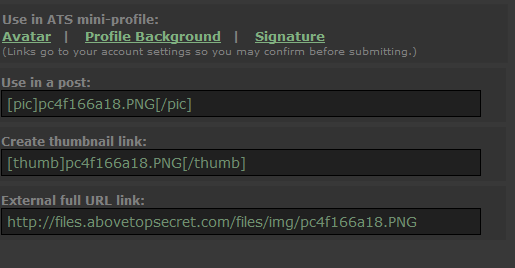
Click the one you want to embed in the post, here I used the [pic] one and then you are done!
Then you need to upload your picture:
Once it is uploaded click the picture itself, and you'll see this:
Click the one you want to embed in the post, here I used the [pic] one and then you are done!
I just practicing here, is all.........



Yay it worked! After all the years I'd been loitering abouts here, I never done this before. It's easier than falling off of a log.
Pictures, cuz it did happen
new topics
-
The functionality of boldening and italics is clunky and no post char limit warning?
ATS Freshman's Forum: 54 minutes ago -
Meadows, Giuliani Among 11 Indicted in Arizona in Latest 2020 Election Subversion Case
Mainstream News: 1 hours ago -
Massachusetts Drag Queen Leads Young Kids in Free Palestine Chant
Social Issues and Civil Unrest: 1 hours ago -
Weinstein's conviction overturned
Mainstream News: 3 hours ago -
Supreme Court Oral Arguments 4.25.2024 - Are PRESIDENTS IMMUNE From Later Being Prosecuted.
Above Politics: 4 hours ago -
Krystalnacht on today's most elite Universities?
Social Issues and Civil Unrest: 4 hours ago -
Chris Christie Wishes Death Upon Trump and Ramaswamy
Politicians & People: 5 hours ago -
University of Texas Instantly Shuts Down Anti Israel Protests
Education and Media: 7 hours ago -
Any one suspicious of fever promotions events, major investor Goldman Sachs card only.
The Gray Area: 9 hours ago
top topics
-
Krystalnacht on today's most elite Universities?
Social Issues and Civil Unrest: 4 hours ago, 8 flags -
Weinstein's conviction overturned
Mainstream News: 3 hours ago, 6 flags -
Supreme Court Oral Arguments 4.25.2024 - Are PRESIDENTS IMMUNE From Later Being Prosecuted.
Above Politics: 4 hours ago, 5 flags -
Electrical tricks for saving money
Education and Media: 17 hours ago, 5 flags -
University of Texas Instantly Shuts Down Anti Israel Protests
Education and Media: 7 hours ago, 5 flags -
Meadows, Giuliani Among 11 Indicted in Arizona in Latest 2020 Election Subversion Case
Mainstream News: 1 hours ago, 3 flags -
Chris Christie Wishes Death Upon Trump and Ramaswamy
Politicians & People: 5 hours ago, 2 flags -
Any one suspicious of fever promotions events, major investor Goldman Sachs card only.
The Gray Area: 9 hours ago, 2 flags -
Massachusetts Drag Queen Leads Young Kids in Free Palestine Chant
Social Issues and Civil Unrest: 1 hours ago, 2 flags -
God's Righteousness is Greater than Our Wrath
Religion, Faith, And Theology: 13 hours ago, 1 flags
active topics
-
Late Night with the Devil - a really good unusual modern horror film.
Movies • 6 • : BrotherKinsMan -
"We're All Hamas" Heard at Columbia University Protests
Social Issues and Civil Unrest • 285 • : YourFaceAgain -
University of Texas Instantly Shuts Down Anti Israel Protests
Education and Media • 165 • : cherokeetroy -
SETI chief says US has no evidence for alien technology. 'And we never have'
Aliens and UFOs • 68 • : YourFaceAgain -
British TV Presenter Refuses To Use Guest's Preferred Pronouns
Education and Media • 161 • : Annee -
Massachusetts Drag Queen Leads Young Kids in Free Palestine Chant
Social Issues and Civil Unrest • 8 • : 5thHead -
Chris Christie Wishes Death Upon Trump and Ramaswamy
Politicians & People • 17 • : network dude -
University student disciplined after saying veganism is wrong and gender fluidity is stupid
Education and Media • 49 • : BrotherKinsMan -
God's Righteousness is Greater than Our Wrath
Religion, Faith, And Theology • 27 • : confuzedcitizen -
Candidate TRUMP Now Has Crazy Judge JUAN MERCHAN After Him - The Stormy Daniels Hush-Money Case.
Political Conspiracies • 763 • : matafuchs