It looks like you're using an Ad Blocker.
Please white-list or disable AboveTopSecret.com in your ad-blocking tool.
Thank you.
Some features of ATS will be disabled while you continue to use an ad-blocker.

How do I...?
page: 1share:
Hello Friends:
How do I avatar?? I have no clue in
how to do this
How do I avatar?? I have no clue in
how to do this
1. Once you have found an image that you like right click on the image and save it your desktop.
2.On ATS click on the mCENTER button.
3. In the mCENTER on the left side there is the "Upload center" Here you can upload your new avatar to the ATS server.
4. Click the browse button and find the image on your desktop. Select it and then hit the upload button. After this, the Image URL will appear on your screen, copy this URL.
5. Next go to the settings button on the top left of the ATS website. Then select Edit Profile.
6. Scroll down until you find "Avatar URL:" Paste your Image URL into the empty box.
7. Click the EDIT profile button at the bottom of the page.
Remember to follow ATS's Avatar and Signature Guidelines
I hope that helps
2.On ATS click on the mCENTER button.
3. In the mCENTER on the left side there is the "Upload center" Here you can upload your new avatar to the ATS server.
4. Click the browse button and find the image on your desktop. Select it and then hit the upload button. After this, the Image URL will appear on your screen, copy this URL.
5. Next go to the settings button on the top left of the ATS website. Then select Edit Profile.
6. Scroll down until you find "Avatar URL:" Paste your Image URL into the empty box.
7. Click the EDIT profile button at the bottom of the page.
Remember to follow ATS's Avatar and Signature Guidelines
I hope that helps
It's right here near the top of this page. The links will take you to all the needed "how to" pages.
www.abovetopsecret.com...
www.abovetopsecret.com...
Hello Friends:
Thank you every one!! It worked this Time!!
I got avatar,Soooooooooooo Cool
Thank you every one!! It worked this Time!!
I got avatar,Soooooooooooo Cool
Originally posted by sanctum
Avatar Instructions is a great guide, and welcome to ATS.
Hmmmm, maybe it's about time to update some of those screen shots.
With all the improvements lately, some of the old "handbooks" could use a little polish.
This one in peticular could confuse a few new members since now it would just be in "settings" now.
Any qualified takers?
[edit on 1/28/06 by redmage]
Howdy Folks,
I'm very new and I am attemting to create my avatar, but I don't believe it worked. I followed the instructions and rules as far as I can tell but the image did not "appear" on my profile edit page after I was finished. At any rate, it's nice to meet you all.
I'm very new and I am attemting to create my avatar, but I don't believe it worked. I followed the instructions and rules as far as I can tell but the image did not "appear" on my profile edit page after I was finished. At any rate, it's nice to meet you all.
Originally posted by lonewolf37
Howdy Folks,
I'm very new and I am attemting to create my avatar, but I don't believe it worked. I followed the instructions and rules as far as I can tell but the image did not "appear" on my profile edit page after I was finished. At any rate, it's nice to meet you all.
You need to upload it to ATS.
Here's a guide: www.abovetopsecret.com...
The address of your image is showing as Cocumentsand Settings/blah/blah/image.jpg
The avatar won't show if it's on your computer.
Hope that helps.
This was posted to a separate thread (which I got rid of to consolidate things):
In the member upload center:
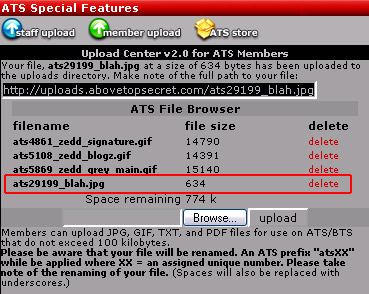
1) Click the browse button and locate the file on your computer. In my case the file was blah.jpg
2) Then click upload
3) You will be given a web address (in the black bar in my image). In my case: files.abovetopsecret.com...
4) Click the SETTINGS button on the top ATS bar. Then click EDIT profile on the next page.
5) In the avatar box...just past in the url you were given.
files.abovetopsecret.com...
If you forget the url, clicking the image name in the member center will launch it. That should do it.
It's not very easy is it?
Hello ZeddicusZulZorander,
Thanks for the assist. I followed the instructions again and used your pointers and it seemed to work fine on the surface. But at the end it said my image was too large. However it was only around 25 k and was less than the pixel limit as well. I tried multiple times and no luck. Am I missing something else here?
In the member upload center:
1) Click the browse button and locate the file on your computer. In my case the file was blah.jpg
2) Then click upload
3) You will be given a web address (in the black bar in my image). In my case: files.abovetopsecret.com...
4) Click the SETTINGS button on the top ATS bar. Then click EDIT profile on the next page.
5) In the avatar box...just past in the url you were given.
files.abovetopsecret.com...
If you forget the url, clicking the image name in the member center will launch it. That should do it.

This is the image in my upload file that I am trying to use as my avatar. I have resized the image multiple times and have uploaded it even more, deleting the others that came before so as not to trash up my upload image area on your page. I have followed your directions to the letter and I am still getting the message that my image is too large and the process is being cancelled. I don't think the image exceeds the size limits or any other boundaries that I read in the instructions. I am going to give up for now and concentrate on conversing rather than accessorizing. Thanks for fixing my thread problem, I had no intension of starting a new one. I will learn the ropes as I go I suppose so I hope you will forive some of these little mistakes.
It must have been this image in particular or maybe the fact that I didn't change the name of the image after my first failure, but when I switched
to a different image, it worked the very first time. Thanks again for the help.
Originally posted by lonewolf37
It must have been this image in particular or maybe the fact that I didn't change the name of the image after my first failure, but when I switched to a different image, it worked the very first time. Thanks again for the help.
That's because the image you put in the post above is too wide.
This is thet max: 160 pixels wide, by 320 pixels tall
The one in the post above is 220 pixels wide and 155 pixels tall.
Ok... kind of a weird one, here... as you can see, I have in the past loaded and assigned an avatar. But of course the site has changed a bit, and
now, when I go to my upload center from the member center menu, the page I get is [i[completely blank. I'm assuming that this isn't normal, and
I've been having real problems with my account lately...
Just to clarify, the top and side bars are ok, but there's a space in the middle which is obviously meant to show upload information, and it's totally empty.
Can anyone out there help?
Just to clarify, the top and side bars are ok, but there's a space in the middle which is obviously meant to show upload information, and it's totally empty.
Can anyone out there help?
Can you make a screen capture??
"Print Scr"
Open MS Paint
Edit >> Paste
Save as imagename.jpg
"Print Scr"
Open MS Paint
Edit >> Paste
Save as imagename.jpg
HOW embarrassing?
the problem seems to have solved itself. I can now see everything I should be able to. How odd... but where I now see a rectangular panel headed "Upload Center v2.0" etc., previously there was just a white or very pale grey rectangle.
Thanks anyway... whatever you did or didn't do, it seems to have worked.
the problem seems to have solved itself. I can now see everything I should be able to. How odd... but where I now see a rectangular panel headed "Upload Center v2.0" etc., previously there was just a white or very pale grey rectangle.
Thanks anyway... whatever you did or didn't do, it seems to have worked.
It was probably that your computer had the old "settings" files in your cache. And had'nt updated right away.
At least it sounds good on paper.
When was the last time you logged on prior to today?
okay i see it.
you probably hadnt accessed settings for a good while.
[edit on 7/20/2006 by Mechanic 32]
At least it sounds good on paper.
When was the last time you logged on prior to today?
okay i see it.
you probably hadnt accessed settings for a good while.
[edit on 7/20/2006 by Mechanic 32]
Yeah, I've been away... for some reason, my password wouldn't let me in and it was REALLY DIFFICULT to get back on. I had to write to SO and MrGray
himself and it was eventually sorted.
Thanks.
richard
Thanks.
richard
Wierd one - I've uploaded one avatar. I have 118Kb left and I'm trying others - all small . 30KB - but when I do all that happens is that the
section of the page in 'upload' goes blank & jpg etc don't upload.
Don't think it's me - any suggestions?
Don't think it's me - any suggestions?
Your avatar is working and we have already been helping you on this thread...
AVATAR: The Ultimate Help
new topics
-
Late Night with the Devil - a really good unusual modern horror film.
Movies: 24 minutes ago -
Cats Used as Live Bait to Train Ferocious Pitbulls in Illegal NYC Dogfighting
Social Issues and Civil Unrest: 1 hours ago -
The Good News According to Jesus - Episode 1
Religion, Faith, And Theology: 3 hours ago -
HORRIBLE !! Russian Soldier Drinking Own Urine To Survive In Battle
World War Three: 5 hours ago -
Bobiverse
Fantasy & Science Fiction: 8 hours ago -
Florida man's trip overseas ends in shock over $143,000 T-Mobile phone bill
Social Issues and Civil Unrest: 8 hours ago -
Former Labour minister Frank Field dies aged 81
People: 10 hours ago
top topics
-
President BIDEN Vows to Make Americans Pay More Federal Taxes in 2025 - Political Suicide.
2024 Elections: 17 hours ago, 19 flags -
Florida man's trip overseas ends in shock over $143,000 T-Mobile phone bill
Social Issues and Civil Unrest: 8 hours ago, 8 flags -
SETI chief says US has no evidence for alien technology. 'And we never have'
Aliens and UFOs: 12 hours ago, 7 flags -
This is our Story
General Entertainment: 15 hours ago, 4 flags -
Former Labour minister Frank Field dies aged 81
People: 10 hours ago, 4 flags -
Cats Used as Live Bait to Train Ferocious Pitbulls in Illegal NYC Dogfighting
Social Issues and Civil Unrest: 1 hours ago, 4 flags -
Bobiverse
Fantasy & Science Fiction: 8 hours ago, 3 flags -
HORRIBLE !! Russian Soldier Drinking Own Urine To Survive In Battle
World War Three: 5 hours ago, 2 flags -
Late Night with the Devil - a really good unusual modern horror film.
Movies: 24 minutes ago, 1 flags -
The Good News According to Jesus - Episode 1
Religion, Faith, And Theology: 3 hours ago, 0 flags
active topics
-
How ageing is" immune deficiency"
Medical Issues & Conspiracies • 29 • : rickymouse -
"We're All Hamas" Heard at Columbia University Protests
Social Issues and Civil Unrest • 278 • : KrustyKrab -
Silent Moments --In Memory of Beloved Member TDDA
Short Stories • 70 • : zosimov -
-@TH3WH17ERABB17- -Q- ---TIME TO SHOW THE WORLD--- -Part- --44--
Dissecting Disinformation • 650 • : angelchemuel -
Thousands Of Young Ukrainian Men Trying To Flee The Country To Avoid Conscription And The War
Other Current Events • 135 • : twistedpuppy -
President BIDEN Vows to Make Americans Pay More Federal Taxes in 2025 - Political Suicide.
2024 Elections • 89 • : DBCowboy -
Late Night with the Devil - a really good unusual modern horror film.
Movies • 0 • : devilhunter69 -
New whistleblower Jason Sands speaks on Twitter Spaces last night.
Aliens and UFOs • 52 • : 0bserver1 -
SETI chief says US has no evidence for alien technology. 'And we never have'
Aliens and UFOs • 33 • : 0bserver1 -
Mood Music Part VI
Music • 3099 • : BrucellaOrchitis